

Description
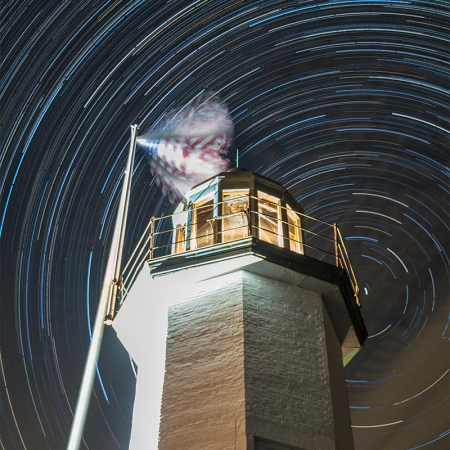
Learn how to photograph and post-process a time-lapse video, like this one:
Join me for a comprehensive two-part workshop on mastering time-lapse photography and video creation using your DSLR or mirrorless camera. Whether you’re a beginner looking to expand your skills or an intermediate photographer ready to elevate your work, this hands-on experience will guide you from planning and shooting in the field to professional post-processing.
In this limited-enrollment workshop (only 10 participants), you’ll learn how to capture dynamic time-lapse sequences that transform ordinary moments into mesmerizing videos—think clouds racing across the sky, boats gliding through Boston Harbor, or the dramatic shift of light over historic landmarks.
Part 1: On-Location Shoot at Castle Island, Boston
We’ll meet at the iconic Castle Island in South Boston, a photographer’s paradise with sweeping views of Boston Harbor, the city skyline, Fort Independence, and Pleasure Bay. This historic peninsula offers endless opportunities for compelling time-lapses: dramatic sunsets, moving clouds, waves on the shore, or the bustling activity of planes, boats, and people.
During the shoot, you’ll get personalized guidance on:
- Selecting the best camera settings for time-lapse (interval timing, exposure, white balance, and more)
- Using intervalometers or your camera’s built-in features
- Choosing the right lenses, tripods, and accessories for stability
- Composition techniques tailored to the location and changing light
- Troubleshooting common challenges like battery life, weather, and flickering
Part 2: Zoom Post-Processing Class
Back at your computer, we’ll dive into turning your raw image sequences into polished, professional time-lapse videos. Using popular software like Adobe Lightroom, Photoshop, Adobe Bridge, along with time-lapse software (such as the trial version of LRTimelapse and the free DaVinci Resolve), you’ll learn:
- Importing and organizing large image sequences
- Deflickering, exposure adjustments, and techniques.
- Adding smooth motion, transitions, and basic effects
- Exporting high-quality videos for social media, portfolios, or client work
- Tips for creating smooth video clips.
By the end of the workshop, you’ll walk away with your own completed time-lapse video, newfound confidence, and practical skills you can apply to any future project.
Why Castle Island?
This scenic waterfront spot is one of Boston’s best locations for time-lapse photography, offering a mix of natural beauty, urban energy, and historic charm—all in one accessible park with walking paths and open views.
Workshop Details Section
- Format: Two-part series
- Part 1: In-person on-location shoot at Castle Island, South Boston
- Part 2: Live interactive Zoom post-processing session
- Group Size: Limited to 10 participants for personalized instruction and feedback
- Skill Level: Beginner to advanced (basic familiarity with your DSLR or mirrorless camera recommended)
- What to Bring: Your DSLR or mirrorless camera, lenses, sturdy tripod, intervalometer (a must have unless your camera has a built-in one), ND filters, fully charged batteries, memory cards, and a notebook. Weather-appropriate clothing and comfortable walking shoes are essential.
Provided: Detailed handouts, resource lists, and ongoing support after the workshop.
Part 1 – On Location Shoot
Date: Friday, June 5th
Place: Castle Island, Boston
Time: 09:00 am – 12:30 pm
Part 2 – Post-Processing
Date: Saturday, June 6th
Place: 3-hour Interactive Online Session
Time: 09:00 am – 12:00 pm
Registrants will have access to the recorded Zoom class.
Register
Spots are strictly limited to 10 participants to ensure quality, one-on-one guidance. Secure your place today and start creating cinematic time-lapse videos that capture the beauty of Boston and beyond!
Ready to turn hours of real time into seconds of breathtaking video? Register now or contact me with any questions.
Once registered for the workshop, I will send out full details to you for gear requirements. The specific location to meet will be sent a few days prior to the event.
In case of severe inclement weather, the workshop will be rescheduled**.
I also accept Zelle, checks, Venmo, PayPal, and CashApp. Use this form if you wish to use any of these.
Credit Card payments accepted. As I am no longer able to absorb their ever-increasing fees, I sadly have to pass their fees on to you. A credit card convenience fee has been added to the workshop tuition for credit card payments.
For any questions, please contact me.
** If you are sick or feeling unwell (please stay home), I will gladly give you a credit towards a future class. If the reschedule date conflicts with your schedule, you may use the registration fee towards another workshop.
(Registration button opens another tab)




 Silvana Della Camera
 Silvana Della Camera








Reviews
There are no reviews yet.